Aircada – 3D Product Configurator for Shopify
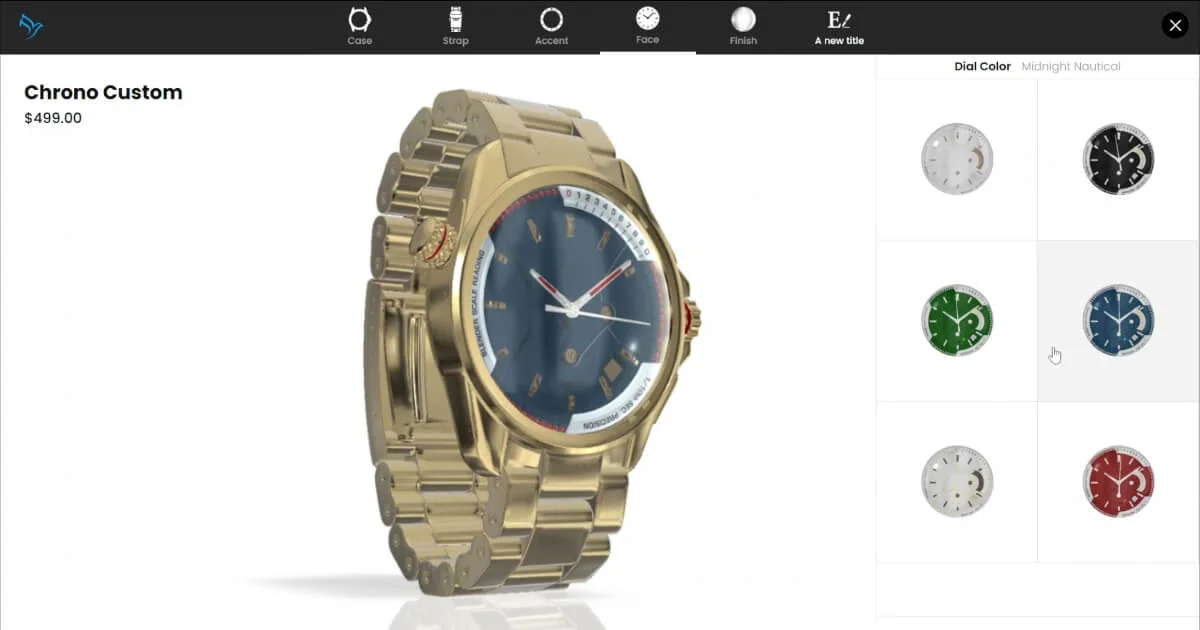
Aircada adds interactive 3D product configurators to Shopify stores. Choose colors, materials, and engravings in real-time without app installs or code changes.
TL;DR
TL;DR: Aircada embeds interactive 3D product configurators directly into Shopify product pages — shoppers rotate, zoom, and customize products in-browser with no app installs or code required.
Source and Accuracy Notes
- Project page: aircada.com
- Shopify App: aircada.com/pricing
- HN launch thread: news.ycombinator.com/item?id=43626516 (Show HN, April 2025)
- License: Proprietary SaaS (no open-source license applies — this is a hosted product)
What Is Aircada?
Aircada is a Shopify app that adds HTML5-based 3D product configurators to eCommerce product pages. When installed, shoppers can rotate, zoom, and customize products — changing colors, materials, engravings, or other options — directly on the product page without loading a separate app or leaving the page.
The product positions itself as a no-code alternative to building custom 3D visualization tooling. Rather than requiring a developer to integrate Three.js or a 3D rendering pipeline, merchants add a block to their Shopify theme and the configurator renders on the product page automatically.
Supported niches include:
- Sports and Outdoors (helmets, equipment)
- Apparel and Accessories (jewelry, bags)
- Jewelry and Luxury goods
- Home and Furniture
- Custom Merchandise (mugs, prints)
- Gaming and Tech (PC cases, accessories)
Setup Workflow
Step 1: Install the Shopify App
Aircada is distributed as a Shopify app. From the pricing page, click Install App and approve the Shopify permissions. The app connects to your Shopify store and creates the necessary theme blocks.
Step 2: Add the Configurator Block to Your Theme
After installation, Aircada adds a Theme Block to Shopify’s Customizer. Go to your Shopify theme editor:
- Open any product page in the Shopify Customizer
- Add the Aircada Configurator block to the product template
- Select which product variants should trigger the 3D viewer
No code edits are required. Shopify’s native theme block system handles the integration.
Step 3: Configure Product Options
In the Aircada merchant dashboard, map each Shopify product variant to its corresponding 3D material or color option. When a shopper selects a variant in Shopify, the 3D view updates to reflect that choice in real-time.
Step 4: Publish
Once configured, the 3D configurator appears automatically on the product page for shoppers browsing your store on desktop and mobile.
Pricing
Aircada uses a flat-rate transaction fee model rather than recurring monthly subscriptions. Fees apply per successful sale through the configurator:
- Free tier: No monthly fee. Aircada takes a per-transaction cut on sales made through the 3D configurator.
- Pro and Scale tiers: Higher volume tiers reduce the per-transaction fee as your sales grow.
The exact fee percentages are not publicly listed on the website — interested merchants need to request access or check the Shopify app listing for current rates.
Practical Evaluation Checklist
- Shopify native theme block integration (no dev required)
- Works on mobile and desktop browsers (HTML5, no WebGL install)
- Real-time variant switching in 3D view
- Supports customization options: colors, materials, engravings
- Designed for multiple eCommerce verticals
- Transaction fee model rather than monthly subscription
Security Notes
Aircada runs as a Shopify app and operates within Shopify’s permission model. The 3D viewer loads assets from Aircada’s CDN — verify with your security team whether external CDN asset loading is within your store’s content security policy before going live.
FAQ
Q: Does Aircada require WebGL or a browser plugin? A: No. The configurator is HTML5-based and runs in standard mobile and desktop browsers without plugins.
Q: Can I use Aircada with a custom Shopify theme? A: Yes, as long as your theme supports Shopify’s Theme Block system (available on most modern Shopify themes). Older themes may require manual integration.
Q: Does Aircada work for stores outside of Shopify? A: Currently the product is focused on Shopify merchants. A WooCommerce or standalone embed version is not listed on the website.
Q: Are 3D model files uploaded to Aircada’s servers? A: Product 3D assets are hosted on Aircada’s CDN and served to shoppers through the configurator. Consult the privacy policy for details on asset storage and retention.
Conclusion
Aircada fills a specific gap in Shopify eCommerce: merchants who want interactive 3D product visualization without hiring a 3D developer or subscribing to an enterprise CMS. The flat-rate fee model is attractive for growing stores, though the lack of public pricing makes it harder to compare against alternatives upfront.
If you run a Shopify store selling customizable physical products, Aircada is worth a trial — especially if your current product pages rely on static images to show variant options.
Source and Accuracy Notes
- Project page: aircada.com
- Source repository: N/A (proprietary SaaS product, no public source repo)
- License: Proprietary SaaS
- HN launch thread: news.ycombinator.com/item?id=43626516 (verified April 2025)
Related Posts
review
Mosaic – Agentic Video Editing With a Node-Based Canvas
Mosaic lets you build and run multimodal AI video editing agents on a node-based canvas. Upload raw footage, design a workflow, and let AI handle the heavy.
5/28/2026
review
Kita – VLM-Powered Credit Review Automation
Kita uses vision-language models to automate document-based credit review for lenders in emerging markets, parsing 50+ document types from PDFs to photos.
5/29/2026
review
Karumi – AI Product Demos That Personalize at Scale
Karumi uses AI agents to deliver instant, personalized product demos to every visitor — zero humans, any language, fully automated. Here's how it works and.
5/29/2026