1Flow - In-App Surveys That Actually Get Responses
1Flow embeds a JS snippet or mobile library to deliver high-response surveys inside apps. YC W22 backed, 50-70% response rate vs 5-10% for traditional methods.
TL;DR
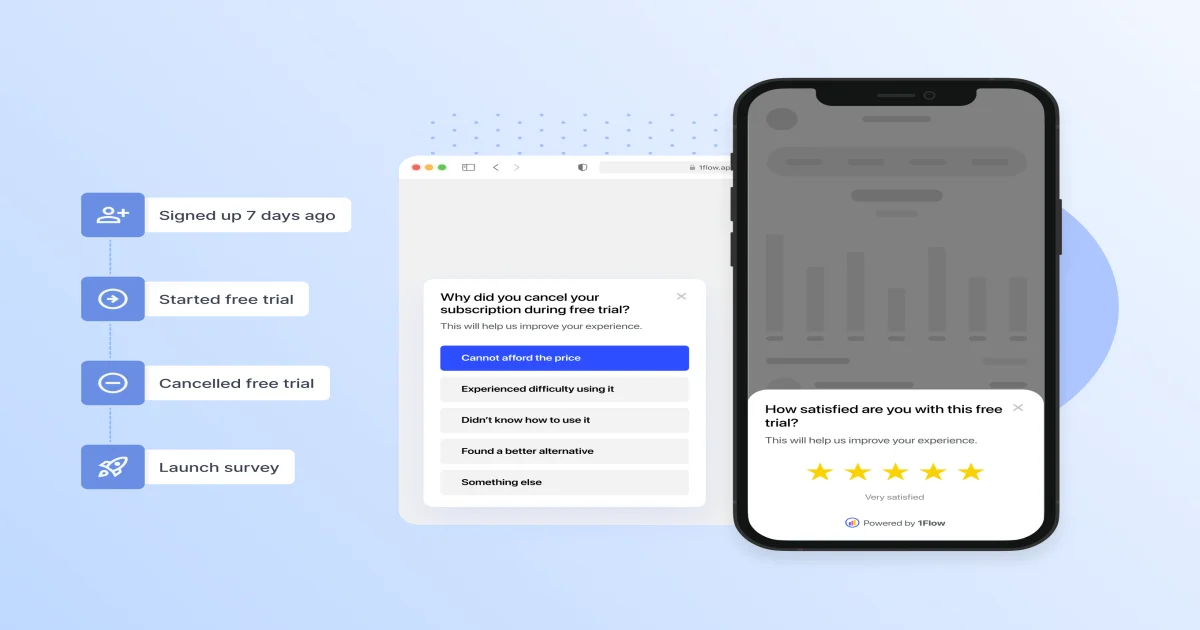
TL;DR: 1Flow replaces intrusive pop-ups with native-feeling in-app micro-surveys that achieve 50-70% response rates — an order of magnitude better than traditional form-based feedback collection.
Source and Accuracy Notes
- HN Launch: Launch HN: 1Flow (YC W22) — 91 points
- Product: 1flow.app
- Story text sourced via HN Firebase API (objectID: 30375206)
What Is 1Flow?
1Flow is an in-app survey platform that embeds directly into web and mobile applications via a lightweight JS snippet or native mobile library. After a roughly 5-minute initial setup, product teams can create, launch, and manage surveys without writing code or waiting for app store approvals.
The core pitch is straightforward: traditional feedback methods achieve 5-10% response rates. 1Flow’s bottom-drawer micro-survey UI consistently hits 50-70%. The founder, Kai, discovered the pattern while doing ASO for his own mobile app — a half-page slide-up drawer that darkened the background (but did not block it) dramatically outperformed full-screen pop-ups and external Google Forms.
YC backed 1Flow in Winter 2022, and the product has been available in self-serve public beta since launch.
How It Works
Step 1: Embed the Snippet
For web apps, add a single JavaScript snippet to your <head>:
<script src="https://cdn.1flow.app/embed.js" data-site-id="YOUR_SITE_ID"></script>
```bash

For mobile apps, install the native library via your package manager:

```bash
# iOS (Swift Package Manager)
https://github.com/1flow/1flow-ios

# Android (Gradle)
implementation 'app.1flow:android:1.x.x'
Both integrations are intentionally minimal — the goal is a one-time setup that requires no app version bump to update survey content.
Step 2: Create a Survey
Log into the 1Flow dashboard, choose your target platform (web, iOS, Android, or cross-platform), and use the visual builder to compose your survey. You can:
- Set trigger conditions (on screen load, after a specific action, when a user meets a cohort criteria)
- Limit responses by count, date, or user segment
- Style the survey card to match your app’s branding
Surveys render as native-feeling slide-up drawers — half-page on mobile, a compact card on desktop — with a darkened backdrop rather than a full modal overlay.
Step 3: Collect and Analyze
Responses appear in real-time on the dashboard. You can filter by:
- User cohort (e.g., users in France, users who completed 3+ transactions)
- Geographic location
- Answer to a specific question (cross-filtering)
Data exports as CSV or pushes via webhook to Amplitude, Slack, Google Analytics, Intercom, or HubSpot — giving teams a single source of truth that feeds directly into existing analytics stacks.
Why Response Rates Matter So Much
The gap between 5-10% and 50-70% is not incremental — it changes the kind of signal you can act on. At 5% response rates, your NPS score is nearly meaningless: your respondents are self-selected fanatics (those who love you enough to click) and detractors (bug reports and ranters). The middle 80% of users — the ones quietly satisfied or mildly disappointed — never appear in your data.
At 50-70% response rates, you get representative samples. You can actually measure whether a recent UX change improved satisfaction, whether users in a specific region are struggling with checkout, or whether your new feature is being discovered at all.
Competitive Landscape
Traditional embedded survey tools (Hotjar, Typeform embed, Qualaroo) focus on enterprise customers with complex pricing and feature bloat. 1Flow’s positioning is explicitly developer-and-startup-friendly: self-serve onboarding, transparent pricing, no video calling or enterprise compliance theater.
The key differentiator is the mobile-first, non-intrusive UI that Kai designed from his own mobile app experience. Most competing tools render a full web view inside mobile apps — clunky, slow, and jarring. 1Flow uses native components that feel like a natural part of the app.
Practical Evaluation Checklist
- JS snippet or mobile library installed (5-minute setup goal)
- Survey created targeting a specific user action
- Response rate compared to previous feedback method
- Dashboard cohort filtering tested
- Webhook or CSV export connected to analytics stack
- Survey styling matched to app branding
Security Notes
Survey data is stored on 1Flow’s servers. If you operate in a regulated industry (healthcare, finance), review their data handling policies and consider whether sensitive user actions should be excluded from trigger conditions. Survey responses that include personally identifiable information should be handled according to your region’s data protection requirements.
FAQ
Q: How long does the initial setup take? A: 1Flow estimates 5 minutes for the JS snippet or mobile library integration. Survey creation and styling in the dashboard adds additional time depending on complexity.
Q: Do surveys require an app store update to change content? A: No. The survey content lives on 1Flow’s servers. You can update questions, styling, trigger conditions, and response limits from the dashboard without resubmitting to the App Store or Play Store.
Q: What is the pricing model? A: 1Flow is free to get started in self-serve mode. Paid tiers unlock additional response limits, team seats, and advanced filtering. Enterprise features (SSO, compliance certifications) are available at higher tiers.
Q: How does 1Flow handle mobile app review rejection from Apple? A: The iOS SDK uses no private APIs and makes no network calls that Apple would flag. The library is static and lightweight — no runtime code loading that could trigger App Store guideline 2.5.1.
Q: Can I target surveys to specific user segments without user IDs? A: Yes. You can trigger based on properties passed via the JS SDK or mobile library, including anonymous session data, without requiring a logged-in user identity.
Q: Does 1Flow work for web apps only (no mobile)? A: Yes. The web-only JS snippet is fully functional without the mobile libraries. You can run web and mobile surveys from the same dashboard.
Conclusion
1Flow solves the feedback blind spot that most mobile and web apps live with. The founder’s insight — that survey UX is the primary determinant of response rates — is backed by a product that performs in the 50-70% range where competitors plateau at under 10%. If you ship product without a systematic feedback loop, 1Flow is worth the 5-minute setup to understand what your users actually think.
- 1flow.app — free self-serve account
- HN Discussion
Related Posts
review
Mosaic – Agentic Video Editing With a Node-Based Canvas
Mosaic lets you build and run multimodal AI video editing agents on a node-based canvas. Upload raw footage, design a workflow, and let AI handle the heavy.
5/28/2026
review
Kita – VLM-Powered Credit Review Automation
Kita uses vision-language models to automate document-based credit review for lenders in emerging markets, parsing 50+ document types from PDFs to photos.
5/29/2026
review
Karumi – AI Product Demos That Personalize at Scale
Karumi uses AI agents to deliver instant, personalized product demos to every visitor — zero humans, any language, fully automated. Here's how it works and.
5/29/2026